


What about Windows app compatibility and all the work that went into that on the ChromeOS front?
This is an interesting one, given how much Google worked to bring Windows app compatibility into Chromebooks over time — with multiple approaches over the years and the goal of closing any remaining gaps for businesses that rely on native Windows software that just won’t work in a web-centric or mobile app environment.
With Googlebook OS, though, Google’s giving that path up — and the devices will not have any manner of Windows app compatibility. I asked what the story was with that and got back the following explanation from a company spokesperson:
Googlebook takes a fundamentally different architectural path than previous platforms. We aren’t attempting to patch together legacy PC software layers or rely on Windows emulation to make a laptop functional.
Instead, Googlebook OS is built directly on the Android tech stack with the desktop foundations of ChromeOS, pairing the world’s largest native app ecosystem with an uncompromised, full desktop Chrome browser.
This makes it easier than ever for developers to build a true desktop-class app experience on the same Android architecture they’ve already built for.
Top developers are deeply invested in Googlebook already. Leading partners like Capcut, Luminar, and Fantastical have built dedicated versions of their products specifically to take full advantage of Googlebook’s desktop performance, multi-windowing, multitasking and keyboard/mouse precision.
Because Googlebook OS is built directly on standard Android, the developer on-ramp is straightforward. Requiring no proprietary rewrites, developers can use standard Android APIs from a single codebase that spans over 3B devices. By adopting large screen guidelines, their apps scale seamlessly from phones, to desktop with low engineering overhead.
Google also noted that the Play Store will feature a specially curated and categorized experience for Googlebook users that breaks recommended apps down into “Made for Desktop,” “Optimized for Desktop,” “Desktop Web Experiences,” and “Mobile Android Apps” sections for easier discovery and understanding.
That all sounds fantastic in concept — but we’ve also been hearing about similar efforts on the ChromeOS front for years, and the fruits of similar-seeming solutions never seemed to fully show up or make much difference in that environment. And also, as usual, this depends largely on developers participating and creating the right kind of software to take advantage of this approach and the framework around it.
For someone who really wants the full desktop version of, say, Adobe Photoshop or Microsoft PowerPoint — or someone whose company has proprietary software that’s available only for Windows — this will seemingly mean that Googlebooks won’t be a good option or a viable path forward.
You mentioned PowerPoint. What exactly would this setup mean for Microsoft Office apps and companies that rely on those tools as part of their workflow?
It means you’ll have to choose between using the Office web apps — which are generally decent and reasonably fully featured but not the same as their desktop counterparts — or using the Office Android apps, which are similarly manageable but, once more, not the full desktop-caliber experience.
Or, of course, you could use Google Docs (which has gotten pretty darn good at Office compatibility over time) or a Linux-based office suite like LibreOffice instead. But that’s arguably a compromise, if the desktop Microsoft Office app is what you want or need.
When asked about this, a Google exec said he’d personally go with the Office Android app over the web app, in that specific scenario. But, again, it’s hard not to see that as a compromise and a possible deal-breaker for anyone who’s fully invested in the Microsoft ecosystem.
Who’s making these Googlebooks, anyway? And how much are they?
Like Android and ChromeOS both, Googlebooks will be made by a variety of different hardware manufacturers. We’ll see five models from five different companies to start:
- The HP Googlebook 14 — a 14″ all-aluminum clamshell started at $1,299
- The Dell XPS Googlebook — a 13.4″ “machined aluminum” laptop starting at $1,199
- The Lenovo Googlebook 15 — a 15″ magnesium-alloy and carbon fiber system starting at $1,299
- The Acer Googlebook 14 — a swiveling convertible aluminum/magnesium laptop/tablet combo that starts at $899
- And the Asus Googlebook 14 — a 14″ aluminum/magnesium computer starting at $1,299
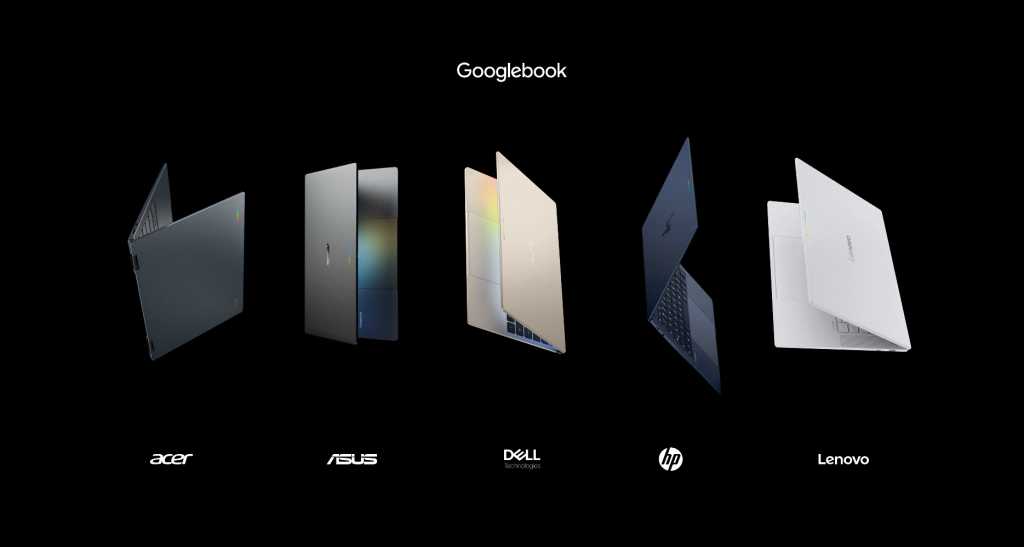
A Google exec described the HP system as being especially high in “craft and care,” the Dell as having the most “flashy design,” the Lenovo as being the “workhorse machine,” the Acer as being the sole convertible, and the Asus as being the most lightweight model.
All of these initial systems also come with a free year of personal access to Google’s AI Pro plan, which includes 5TB of Google cloud storage and would typically cost $200.
Hang on — so Google itself isn’t making one?
Nope — not yet, anyway.
If it ever does, how in the world would it handle the branding for that?!
By calling it the Google Googlebook for Google by Google, presumably.
What about more affordable options — for schools, businesses, anyone who isn’t looking to pay a thousand bucks for a laptop?
What about that, indeed. At launch, at least, Google is deliberately focusing Googlebooks on the premium (and thus also pricey!) market. It’s not clear at this point if or when the category will expand to include more midrange and budget-level systems, but one could certainly imagine those sorts of options coming into the mix over time.
So are Chromebooks going away, then? Is this a replacement?
Kinda-sorta-maybe, but not exactly. Clear as mud, right?
That’s the question I’ve been asking ever since the notion of the Googlebook first came up, and Google’s been artfully dancing around it and avoiding any direct answer ever since.
What the company is saying is that it absolutely is maintaining support for the entire range of current Chromebooks through their promised support windows — and that we’ll see quite a few new Chromebooks launching in the next year yet.
Oh, and that at least some current Chromebooks may be able to transition to Googlebook OS at some unspecified point in the future, with details to be determined.
That’s all well and good — and, by all means, good on Google for not giving up on the products that are out there and the many customers (enterprise, education, and individual) who’ve bought into ’em — but it still doesn’t truly tell us anything about the long-term aim of all of this and if Googlebooks are ultimately meant to take the Chromebook’s place, once devices that were presumably already under development and in the pipeline are done.
What I’d say is that reading between the lines, it certainly seems logical and feels like the idea is for Googlebooks to be the future and Chromebooks to be a legacy, technically-still-supported-but-no-longer-the-primary-focus piece of the past. Some court documents unearthed earlier this year suggest that Google has planned to phase ChromeOS out entirely over the next several years, which would fit in perfectly with the notion of keeping ChromeOS around on the backburner until all current devices are past their promised support periods. And the fact that Google isn’t outright answering this question and saying “Yes, Chromebooks will stick around as an option alongside Googlebooks indefinitely, and we continue to keep actively investing in and developing both” sure makes the answer here seem apparent — even if it isn’t being directly confirmed in any way at this point.
All right — so when can I actually buy a Googlebook?
The five aforementioned devices are all up for preorder as of this week and should start shipping and showing up on store shelves on October 4, for the US, and October 5 for Canada, the UK, Ireland, France, Germany, and Australia.
What happens if you open both Google Books and Google Play Books on a Googlebook, then look for books about Google to save into your Gemini Notebook (formerly known as Google NotebookLM)?
One of three things will absolutely, positively happen:
- You’ll be living the dream.
- You’ll summon the ghost of Mr. Jingles, the old bell mascot from Google+, back from the Google graveyard.
- The universe will spontaneously combust.
Keep me posted.
How many Google Books could a Googlebook book if a Googlebook could book books?
All right. I think we’re done here.
Want even more no-nonsense Googley knowledge? Come check out my free Android Intelligence newsletter to get next-level insight delivered directly to your inbox.
This story originally appeared on Computerworld

