


You might be better off sorting through your 12,000 emails yourself, but you do you.
When you stop to think, it’s incredible how far AI has come in the past four years. From repeatedly failing the “how many r’s are in strawberry” test to being able to generate highly realistic films in minutes. And now, Claude is apparently good enough to fully manage your Gmail inbox, including sending, replying to and forwarding emails on your behalf without your approval.
In its rapid rise, the AI has seen more than its fair share of epic fails; just a short while ago, OpenClaw ignored instructions and deleted Meta Superintelligence Lab AI security and safety researcher Summer Yue’s emails. Clearly, the tech is far from being fail-proof. So handing over something as important as your inbox to Claude obviously comes with its risks, especially now that it can take serious actions like writing and sending emails without your approval (if you allow it to).
Some of the most apparent risks include the possibility of the AI hallucinating false info into an email and sending it before you catch it, Claude misunderstanding a request and sending or forwarding something you never meant, or even more sinister, a hidden prompt in an incoming message hijacking it into acting on an attacker’s instructions. And these risks aren’t theoretical; they’ve actually happened. Thankfully, Claude can’t permanently delete any email, but it can trash or archive them.
Risks of allowing Claude to manage your inbox
Let’s start off with the most dire risk: prompt injection hijacking the agent from inside the email. In plain terms, an attacker could stealthily give Claude instructions by sending an email to you and embedding it with invisible text (white-on-white, zero font size) so that it doesn’t show up in the message you see, but Claude can read and take instructions from it. Hackers can use this to not only monitor your Gmail, but also pull your info, including verification codes to breach your other accounts. Prompt injection hacking is proven, not just hypothetical. Claude even warns about it when you first allow it to send emails.
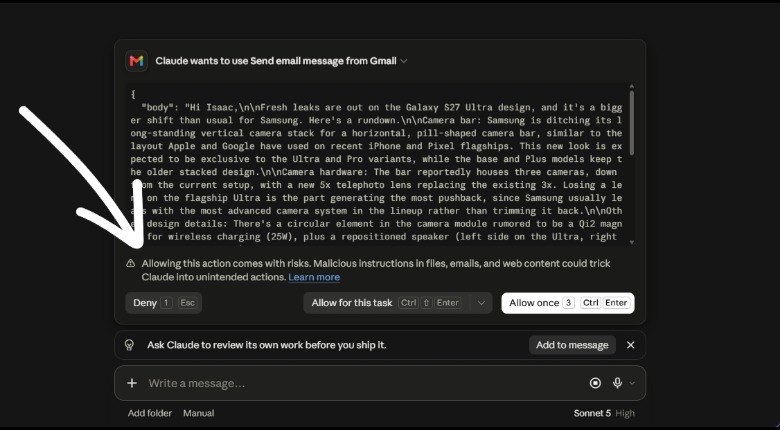 Screenshot by Isaac Egbon (Anthropic)
Not every risk requires an attacker. Because it’s so seamless to ask Claude to send emails on your behalf, the risk of sending an email with errors is a big one. When you ask Claude to send an email for you, it goes straight into thinking and sends the email. What makes this so risky is you don’t get to see or work on the email before it’s sent unless you have the right setting enabled; the AI drafts and sends the email all by itself. So, if there’s a mistake in that email, there’s a high chance your recipient will discover it before you. Unfortunately, a bunch of things can push Claude to make a mistake — from flat-out hallucinating false information to simply misunderstanding what you meant. Even if Claude itself doesn’t make a mistake, there are always the privacy concerns of trusting Claude and Anthropic with all the data in your inbox.
How to mitigate the risks of Claude managing your inbox
The first and most important step in mitigating the risks is to keep approval turned on. Your inbox is too sensitive to let an AI do and send what it thinks is best. So leave the default “ask before sending” behavior active; this way you can review any action before it executes.
Second, when you ask Claude to take action in your email, be very specific in your instructions. Tell Claude what exactly you want it to do or say. For example, rather than using vague prompts like “send HR an email explaining my absence,” include as much detail as possible. Doing this makes it much harder for Claude to misunderstand or misinterpret your instructions.
If you’re worried about prompt injection hacking, unfortunately, there’s no way to eliminate it completely. Simon Willison, who coined the term “prompt injection,” says, “we still don’t know how to 100% reliably prevent this from happening,” and experts remain split on whether it’s even solvable yet.
Your best defense is still keeping approval on, since it’ll make Claude ask for your approval before taking any action. Staying cautious with unfamiliar senders and enabling multi-factor authentication (MFA) elsewhere help too, but there’s still a significant level of risk.
This story originally appeared on Engadget

